Adrenaline Shot: The Aston Martin DB9 Special

James Bond started it with the DB5. Let us take an inside look at the latest iteration of the DB series, the DB9.

Showing posts with label App Review. Show all posts

Analyzed: Project Tango

"The future is awesome. We can build it faster together." That's the tag line from the latest venture from the geniuses at Google; Project Tango. Leave it up to them to come up with real world applications of something that we used to see in Sci-Fi TV shows or movies back in the day.

Project Tango is a focused exploration of what might be possible in a mobile platform. It is not part of Android today (even though it is being built on Android). It is still in its infancy and the technology begins the transition out of research labs into the hands of millions of people.  The goal of Project Tango is to give mobile devices a human-scale understanding of space and motion. 

The current prototype is a 5” phone containing customized hardware and software designed to track the full 3D motion of the device, while simultaneously creating a map of the environment. These sensors allow the phone to make over a quarter million 3D measurements every second, updating its position and orientation in real-time, combining that data into a single 3D model of the space around you.

What if you could capture the dimensions of your home simply by walking around with your phone before you went furniture shopping? What if directions to a new location didn’t stop at the street address? What if you never again found yourself lost in a new building? What if the visually-impaired could navigate unassisted in unfamiliar indoor places? What if you could search for a product and see where the exact shelf is located in a super-store? These are the questions Project Tango is trying to answer. While no actual application has been determined yet, it is only a matter of time before the boffins at Google (or the other institutions that are partnering in this initiative) figure it out!

To learn more about Project Tango, visit their website or view the video below:


Source: Project Tango

Cool App: Connect

In today's crazy world where social networking sites are a dime a dozen, how does one keep track of all their connections? What if you wanted to know more about your connections, be it through Facebook or Linkedin and the ilk? How about WHERE your connections are? How about getting automatically notified when one of them happens to be in your town? Mindful of the fact that the location based feature has been around for a while through Google Maps or Foursquare, this is the first time the data is pulled from all your social networking contacts into a single unifying and visually appealing format. Enter Connect.

In their own words, "Today, through email, mobile phones and social media, we're interacting with many times more people than we were even a decade ago. And as increasingly mobile people ourselves, we just keep creating new relationships - every time we attend a conference, switch jobs, or join a friend's dinner party.

Whereas many companies are all about helping you find new people, our aim is to help you make the most of the relationships you already have."

Using Connect is as simple as it gets:
  1. Visit Connect's site or download the iOS app (for now, the Android version is in the works). 
  2. Sign up. 
  3. Connect to your social networks. 
  4. Connect will then display a visual map with all your contacts around the world. It will also notify you — unless you specify otherwise — when a friend travels to your city.
Currently available on the web and through the iTunes Store, the company is also working on an Android version of the app. Judging by what the company has achieved in such a short time span (they are less than 2 years old), we can't wait to see what else they have in store in the upcoming months!

Cool App: AnTuTu Benchmark

AnTuTu Benchmark is a free benchmarking app that helps users to dive deeper into their Android devices. Users can compare also their own device with popular devices which also have powerful hardware performance. The following functionality is available as part of AnTuTu's free app on Google Play:
  1. User Experience (UX): Gives each user a direct impression on smart phone performance with detailed scores
  2. CPU Tests: Lets the individual user know how powerful a CPU they have, with detailed score points
  3. RAM Tests: Reflects the real processing ability to RAM of the Android smart phones
  4. GPU Tests: Helps users to know the real performance in gaming to GPU of the smart phones/tablets
  5. I/O Tests: Tells a direct score to show how good your smart phone I/O performance is
In addition to creating the benchmark scores, the app also lets you view additional information about your Android device (sensor status etc.). This is similar to another app Anfish that we reviewed earlier. The screenshot above was from a Samsung Galaxy Note 2 and as you can see our test device fell short of the average benchmark score for the Note 2. Needless to say, we will be doing a little more deep diving to see why the numbers are off!

Cool App: Any Send

Have you ever used Dropbox? Then you have a fair idea of how file transfer sites work. Well, there is a new kid in town and it's called Any Send. It uses a similar concept as the Dropbox, where you can drag and drop your file(s). So there is nothing new there. What AnySend does have going for it is the fact that it does have a desktop application for Windows or MacOS X using which you can just drag and drop your file(s). It also has an easy to use app (for Android and iOS) as well. And the best thing is that while using the desktop application, there is no limit on the size of the files that can be transferred. We doubt this will last as the product picks on, but for now, this does give it an edge over the more established players. It is still in the Beta phase so there might be a few kinks in it's armor, but all things considered, it is still a good alternative to some of the other heavier sites out there.

The concept and execution of Any Send works with more platforms. Once you have the app installed on multiple devices on the same Wi-Fi network, just copy a file to the clipboard, or open it in the mobile app, then click the name of the device you want to send it to. Within seconds, the file will appear on the target device. The concept is simple, but the execution is pretty much flawless.

Included below is a video that gives a brief overview of Any Send.


"You've Got Mail!" is back!

If you have been around since the advent of webmail, you know about the "You've Got Mail!" slogan from AOL. One of the first webmail sites it took the world by storm. Millions of users signed up for AOL Webmail (whether they wanted to or not) and it looked like there was no looking back for AOL. Hotmail also had its fair share of users as well. Fast forward to 2004, GMail is introduced. Since then we haven't heard a peep out of AOL and Google's GMail service has become the defacto standard for webmail since then. But now AOL is back. With a bang!

AOL today announced Alto, a web-based IMAP email client that lets you manage multiple email accounts on one website. "We found that nobody wants another email address," Senior Director of Product for AOL Mail and Alto Joshua Ramirez told The Verge. "People have multiple email addresses, and they want to get it in one spot, so we went back to the drawing board and came up with something we think is game-changing." The web app is available today by invite only, and will launch to the general public in the first quarter of 2013.

Alto looks and works like most email clients you've used, but was born with one priority in mind: get rid of all the detritus clogging your inbox and divide it into "Stacks". Alto automatically creates stacks for daily deal emails (Groupon), retail emails (Best Buy) and social networking site notifications (Facebook) — three of the most common culprits of messy inboxes. You can also create stacks of your own, which function like Gmail folders that pipe in messages from certain senders. When you click a stack, you see one of three views: message view, tile view, or page view. Message view looks like Sparrow, but adds a unique pie chart to show where the bulk of the messages in that stack are coming from. Tile view creates a grid of messages, each message symbolized by the image in each message (which works well for browsing Groupon or LivingSocial offers). Page view is designed for flipping through your daily deals emails in full-screen as if they were old Sunday Best Buy ad books, Ramirez says.

Whether Alto will take off as well as AOL Webmail remains to be seen. But it is definitely a refreshing take on webmail. Furthermore throwbacks are currently in style. So, here's hoping for a resurrection of the "You've Got Mail!" slogan once again.

Source: TheVerge

Analyzed: True Caller

Do you get annoying calls at odd hours? Or do you get prank phone calls? Have you ever wanted to know who is actually trying to reach you? We found one of the best free apps just for that. True Caller. And it's available for download for the iPhone, Android devices, BlackBerry, Sybian and Windows Mobile!

Truecaller is a global phonebook service which brings all the contact information of the world into your smartphone. In addition to its worldwide number lookup service, Truecaller can help you block unwanted calls, keep your phonebook up to date with current information and even map your phonebook with the social networks you use regularly. You can use it no matter what country in the world you are in. If privacy is a concern, they get the data partly through partnerships with different white/yellow pages around the world and partly through their own opt in database. We also love the fact that repeat offenders (read: telemarketers) can be completely blocked out of your phone.

True Caller is actually quite nifty. Here is a real world scenario where this comes in handy. You went to school with someone as a kid and lost touch with them. You run into them a few years later but forgot their name, but they haven't forgotten yours. Sound familiar? Gets a little awkward doesn't it? You chit chat with them and ask them to give you a call so you can store their number to stay in touch. When they call you, their name pops up. Now you have that AHA! moment and you know who they are. This story actually happened when we were testing it out! So give it a shot... let us know other possible uses you can think of for this app!

Cool App: Asana

Lately we have been reviewing some productivity tools and we came across another tool which we think is just brilliant. Started by Facebook co-founder Dustin Moskovitz, Asana follows the same simplistic styling and usage from Facebook, and has adapted it to create a productivity tool. We reviewed another productivity tool called Trello recently, and while it was good, it did have its shortcomings. Asana on the other hand, looks to have addressed these issues and helps you stay organized and keep track of your tasks and their work assignments with the bare minimum of mouse clicks. Speaking of mouse clicks, the UI experience of Asana is definitely its biggest plus point since you are able to perform every task with the least amount of effort.

Asana lets you divide your projects into workspaces. These workspaces also give you a place to organize all the teams in your life. You can collaborate with your friends, your clubs, and your work team while keeping everything separate. Finding the tasks and priorities for anyone on your team can be performed with one click. You can see what's been marked for Today, and what's waiting to be picked up. And just like a Twitter feed, you can be notified of changes to the tasks and projects that you actually care about. You can also add a coworker to a task and they'll get all the background. All this is real-time too! Plus each task has its own activity feed just like your profile page on Facebook. Pretty cool if you ask us. Asana is definitely designed for speed: You have ample keyboard shortcuts just like you would within Gmail, there are fewer page loads and fewer mouse clicks. And best of all it is a web app that won't slow you down.

In case you are always on the go, there is a mobile app for iPhones at the App Store. Fret not if you don't have an iPhone, the entire site is designed using HTML5 and can be accessed through your handset browser without any problems as well. Just login to the site and see for yourself! And check out the video below and see how easy Asana is to use.

Cool App: Tour My App

If you have ever worked on an application that involves heavy user input, you know the headache that comes with developing a user manual or a demo video for using the application. Yes there are several expensive software that you can use to record your keystrokes, mouse movements and other details you may want to include, but let's face it... it is still a cumbersome process. Tour My App is an application developed by a small start up which lets you create in-application tours for your web app. Intrigued? Read on...

The tours are a series of message boxes that guide users through tasks in your app. You can use tours to engage new users, highlight advanced features, help users perform tasks, or even as a substitute for documentation (so they say). Oh and you don't have to know or do any coding at all (some of the heavyweight applications do require this). Another cool feature is analytics to show how your users use a tour and where they drop out. This can definitely come in handy when you are trying to gauge user interaction for your web application. 

Tour My App comes with some nifty additions like making completely interactive tours, where you can progress the tour when users perform specific actions, like clicking a button or typing some text (similar to a PowerPoint presentation). The look and feel of the demo is also completely customizable. This really is one of the simplest apps we have tested out to create demos and anyone can create one in a matter of minutes. Give it a shot... they do have a free 30 day trial and their pricing is also pretty nominal from what we see. Check out a video that showcases some of the features below:

Cool App: Trello

There are quite a few apps out there which tout themselves as the 'IT' solution when it comes to Agile project management. After having used several apps, we have definitely come across the one tool which is by far the easiest to set up and use. Not to mention the fact that you don't just have to use it for Agile project management. You can even use it to keep track of all your on going activities, their status, due dates and so on. Enter Trello.

Trello is a collaboration tool that organizes your projects into boards. In one glance, Trello tells you what's being worked on, who's working on what, and where something is in a process. A board is your product or project that needs to be tracked. The good thing is that a board can have a variety of uses and mean anything you want it to mean. You can have multiple boards, create lists, attach documents and so on. You can create each list to mean a step on a workflow and include cards - a new feature, a bug, a client, anything really. Members can add themselves to cards, start conversations, create checklists , vote etc. You can also assign color coded labels to your cards. Once again what they stand for is completely up to you.

There is absolutely no system setup required to use the tool, but you will need to perform some minor setup once you login to Trello before it becomes meaningful to you. It is so simple and intuitive that it will take you less than 10 minutes to get going. All you have to do is sign up at Trello's site and you are good to go. Best of all Trello also has mobile apps for Android and iOS. For free. The mobile interface is absolutely fantastic and is just as easy to use as the web based version. There were only a very few activities that we were not able to do on the mobile app compared to the web version. But it doesn't take away from the ease of use one bit. We're just wondering how come we didn't know about this tool any sooner!

Cool App: CamCard

Do you have a lot of meetings where business cards are distributed like candy? Have a hard time keeping track of all the cards and the information in them? You might find CamCard to be a blessing in disguise. Available for download via Google Play, CamCard uses the built-in camera on your phone to take a snapshot of the details on a business card and then saves it to your contacts. It is as simple as that. There are two versions available, a free Lite version and a paid version. But this is one of those apps we wouldn't mind paying for. You won't need to walk around with a wallet stuffed with business cards anymore.

If you opt for the Free version,  you can save 20 cards in the first week, and two more per week after that. If you choose to register, once you login, you will be able to save up to 30 cards, and three more per week after that. Other features include:
  1. 16 language recognition including English, Simplified Chinese, Traditional Chinese, Korean, Japanese, French, Spanish, Portuguese, German, Italian, Dutch, Swedish, Finnish, Danish, Norwegian, Hungarian
  2. All cards can be saved in the Cloud (and of course the information can be saved in Gmail, Exchange or your existing address book)
  3. Backup and restore cards in case of accidental deleting.
  4. Manage and synchronize cards across multiple devices with Cloud Sync
Give it a shot. Something tells us you'll be pulling your wallet out soon to purchase the paid version!

Cool App: Flipboard

Are you one of those people that has accounts on multiple sites? And by multiple sites we are referring to social networking sites, RSS readers, blogs and so on. There are a number of aggregator sites that you can use to access all the information at the same time, but nothing comes close in the ease of use, look and feel as Flipboard

With its visually stunning layout, Flipboard delivers an innovative and easy way to quickly flip through (and yes when you use the app you are literally flipping through articles) all the social media and content you care about. It is available for both iOS and Android operating systems as well. Of course you can choose Flipboard's own selection of topics/articles, but you can just use the ones you are subscribed to (see the screenshot for an example of the layout). And if you create your own Flipboard account, you can see your selection regardless of which device you log into. Creating a Flipboard Account also gives you access to all timelines, a single section containing all the articles and photos being shared across all your social networks.

Based on numerous apps we have used in the past to aggregate all our accounts, for now, Flipboard is definitely the best of the pack. They also seem to have captured the fancy of several major publishers and financiers as well. Time will tell if they can stay ahead of the game, but this is definitely our pick of the moment.

Cool App: MightyText

Most of us carry our phones with us at all times. But not all of us. What if you are playing with your tablet or PC, your phone is away from you (say you left it at work or in your car) and someone texts or calls you? Wouldn't you like to be notified instantly? Here is an app for Android phones which just does that... MightyText

MightyText is the company started by a couple of ex-Googlers and is becoming quite the rage these days especially with its primary feature of being able to access your messages (text or MMS) from anywhere. And we do mean anywhere just as long as you have a browser handy. You can view and send text messages using the MightyText browser extension (available for Chrome, IE and Firefox), sync your Google Contacts to see the names (by default you just see the numbers) and get this, use the on screen app to call people from your phone. That last part would come in real handy if you had your bluetooth headset paired to your phone and wanted to make a call... but were too lazy to go get your phone or of course just call them from the browser! It uses the existing number associated to your Android handset so there is no need to get a new number like with Google Voice.

MightyText is available as a free download from Google Play. Once the app has been installed on your Android smartphone, you can download the browser extension. Then sign-in to MightyText using the Gmail account associated with your handset and you are good to go. Simple as that. Something tells us the adoption rate for this app is going to climb through the roof. Check out the image on the right to see what it looks like in your browser (in this case Chrome).

Geek Alert: Mozilla Thimble

Creating your own webpage used to be a tedious process. Thanks to modern technology, these days that is no longer the case. For those of us who aren't exactly well versed with coding techniques but would still like to publish a site of our own, there are numerous tools that can be used to fulfill our basic necessities. Mozilla Thimble is one of those tools and it has basically made web page design so easy that even a caveman can do it! And any browser will work.

Thimble makes it easy to work with HTML and CSS even if you’ve never done it before. You get to see the effects of your design in real time by just typing on the left panel, and seeing what the finished page will look like on the right. Thimble also helps check your work as you go, providing a simple “spell check” for code to help you spot and squash errors instantly. Thimble also makes publishing as trivial as clicking a button. You can use it to create your own project from scratch or if you want to get a feel for it first, you can also try using it on some of Mozilla's sample projects. Oh and by the way, the sample projects from Mozilla are designed to teach you as you work through them. An interactive tutorial if you will. This is by no means groundbreaking technology since it has existed since the days of Macromedia software, but it is definitely bringing it to the masses. For free. The whole idea is to make people aware of web design and give them the simplest of tools to do so. In that aspect Thimble definitely gets top marks. 

Get started with your own project or by checking out one of Mozilla's sample projects.

Cool App: PressReader

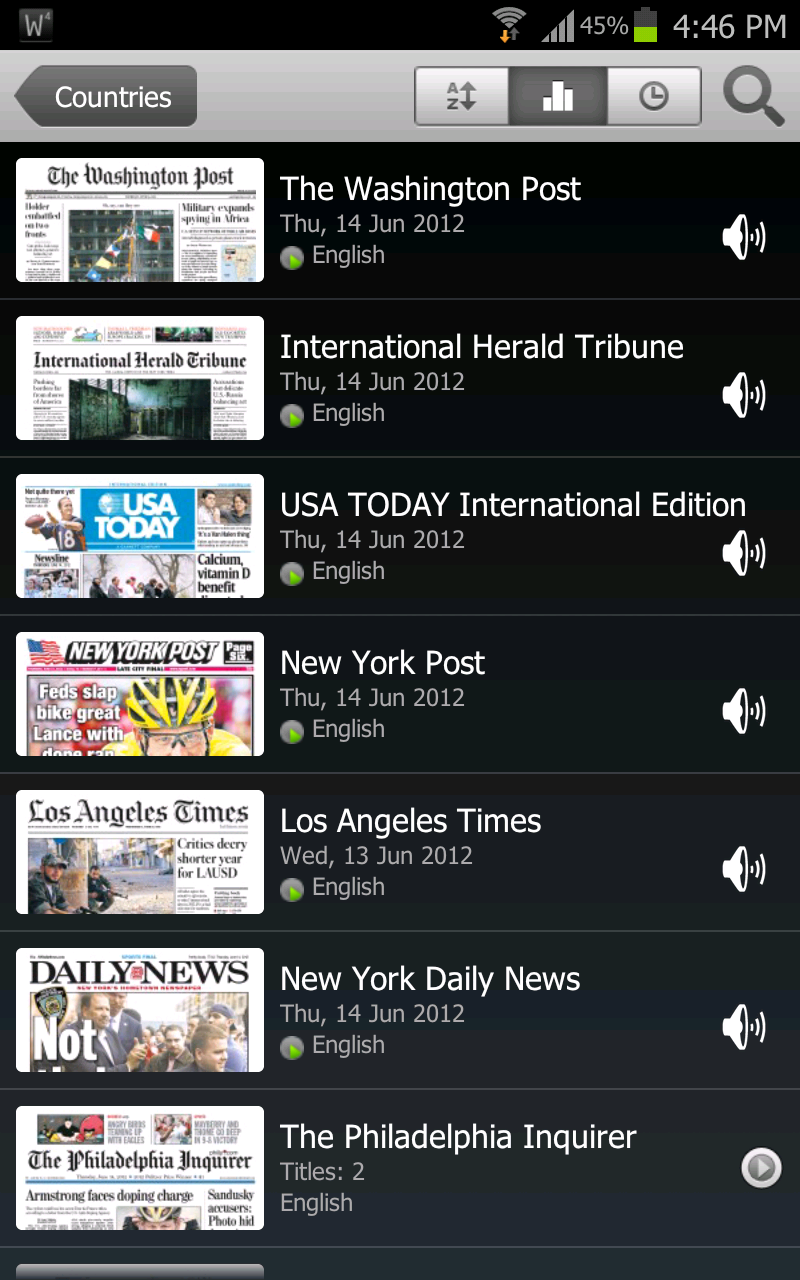
Are you a voracious reader? Especially of newspapers and magazines? Tired of using RSS readers? Miss your local newspaper on the road? PressReader might be the perfect answer for you. PressReader is an app that you can use to download and read the world's most popular newspapers (from 95 countries in 54 languages) on your favorite mobile device. When we checked, there were about 2150 publications. And not just snippets of the newspaper, but the entire thing... ads included. You are basically reading a complete digital replica of publications, which in some cases is before the printed editions hit the newsstands. Every article, advertisement, crossword puzzle and cartoon is presented in its original context.

It is actually quite simple to use. You can search for your favorite newspapers or magazines by country or by language, download the one(s) you want and voila. Kick back with your cup of coffee and browse through the papers. Nothing can replace the feel of paper in through your fingers, but this is probably the next best thing. And the coolest part is that you can view it on pretty much any device out there... Android smartphone? Check. iPad? Check. iPhone? Check. Blackberry? Check. The newspaper is interactive too, with its clickable links, phone numbers etc. You can also have the app read an article for you. Unfortunately only in a male's voice :) A caveat though, from what we tested, the reader function only worked on English publications (on non Apple versions). Here are some of the other features of PressReader:
  1. Flipping pages like you’re reading a real publication
  2. The ability to pan, zoom or rotate pages, articles and photos
  3. Navigating publications using thumbnails or table of contents
  4. Opening full articles in easy-to-read text views
  5. Listening to publications using on-demand audio
  6. Searching online across titles and selecting the titles you wish to download
In closing, PressReader does work as well as it looks. It does come at a price though. To start off you can download a trial version for free, but regular usage requires a subscription. You can pay as you go or sign up for a monthly subscription. As far as we are concerned, it is totally worth it.

For more information on pricing or to read more about PressReader, visit their site. In the meanwhile, click here if you are interested in downloading the app for your device.

Geek Alert: Google Blockly and App Inventor

Not everyone has the knack to pick up coding right off the bat. Many are interested but it can be intimidating to get started... this applies to people who even take CS courses! There are so many programming languages out there, some simple and others not so much. In the past, if you had an interest for coding, the traditional way was to pick up a book and start from scratch. Then as time went along several tutorials were introduced along with online forums where one could ask their questions and get doubts clarified. The one thing that was always lacking was the capability to visualize one's code while developing. Let the geniuses at MIT and Google find a solution for that issue. It is called Google Blockly and was developed as an extension of MIT's App Inventor, an app that lets you develop applications for Android phones using a web browser and either a connected phone or emulator. What this means is anyone can learn to code (either for fun or in case you have a great idea and would like to monetize it by creating an app that can be sold on Google Play). We decided to include both Blockly and App Inventor together since they were developed hand in hand. You can develop applications without knowing any syntax and the app basically lets you drag and drop commands and logic like a big jigsaw puzzle.

Google Blockly
Blockly is a web-based, graphical programming language. Users can drag blocks together to build an application. No typing is required. Blockly is currently a technology preview and anyone can play with it and provide their feedback to the engineers at Google. For now, users can check out the demos and use Blockly to solve a maze, code and export a Blockly program into JavaScript, Dart, Python or XML and see what Blockly looks like in right-to-left mode (for Arabic and Hebrew).

App Inventor
App Inventor lets you develop applications for Android phones using a web browser and either a connected phone or emulator. The App Inventor servers store your work and help you keep track of your projects. Creating an App Inventor app begins in your browser, where you design how the app will look. Then, like fitting together puzzle pieces, you set your app's behavior. All the while, through a live connection between your computer and your phone, your app appears on your phone.

Your app appears on the phone step-by-step as you add pieces to it, so you can test your work as you build. When you're done, you can package your app and produce a stand-alone application to install. If you don't have an Android phone, you can build your apps using the Android emulator , software that runs on your computer and behaves just like the phone. Below is a demo of App Inventor:


Here is more information on App Inventor. All we can say after seeing this is, oh how times have changed!

Cool App: IP Cam Viewer

Are you someone that is always on the move? Don't have anyone to house sit while you are away? Want to keep an eye on your place or kid at home while you are away? IP Cam Viewer is a cool app that we found which can be used to access any camera(s) that you may have already installed at home or to even access the webcam on your laptop on your mobile device. With IP Cam Viewer you can remotely view and control your IP Camera, DVR, and Network Video Recorder using Android. It also includes a database of public web cams around the world like traffic cameras. The app has an upgrade for 2-way audio support on some cameras for use as baby monitor. It also has an upgrade for Record Mode which turns any spare Android device into a solid state, battery backed network recorder for standalone IP cameras. It also allows playback, search and the ability to export videos.

This is a very nifty tool that can be used on an Android, Apple or Blackberry smartphone. You have different views (grid, gallery, zoom) which comes in handy if you have multiple cameras and you can even include a widget on the home screen. Want to share your feed with someone else? Yup. You can do that too. A lot of the features are available for free and we like what we saw. And based on some of the user feedback, it looks like a lot of them have gone ahead and upgraded to the paid version. It's that good.

You can download IP Cam Viewer from Google Play, the Apple App Store or from Blackberry App World. Here is a list of supported devices and detailed information on the features. Below is a demo of IP Cam Viewer on the HTC Desire:


Having trouble finding what RAM your machine needs?

Have you noticed your machine slow down over time? Do programs take forever to open? Are you seeing system notifications that say "low memory" or "out of memory"? Tried clearing and defragmenting the hard drive and got no results? This is a common issue that plagues most older computers. Back then, if your machine came with 512MB RAM it was considered blinding fast. These days though, with 2 or 4GB RAM coming as standard, the legacy machines have just become slow as molasses. The good thing is that RAM has become cheaper over the years. We remember the time when a 256MB RAM chip would cost you over $500! That's just insanity. These days you can buy a new machine for that price. And it isn't just the amount of RAM that has increased, their speed has too.

Before we go on, just a brief lesson here: Random Access Memory, or RAM for short, is the hardware installed directly to the motherboard which provides system memory for loading programs. Depending on the size of the program being loaded, your amount of RAM can speed up or slow down the program while it runs. Just like with the CPU, the faster the memory, the better. With RAM, you have to look at memory capacity BEFORE speed however. There are four different types of RAM: SD, DDR, DDR2 and DDR3 with DDR4  on its way. Ok, so now you know what exactly the RAM is used for.

Not everyone can just afford to throw away an old machine and pick up a new one despite the price of new machines starting around $500. What if you only had a $100? Or a $50? Is that enough to bump up the performance of your machine? It most definitely is. For the interest of this article, we are going to assume that all junk software has been uninstalled from the machine, the hard drive has been defragmented and the processor has NOT been overclocked and is not overheating (there are apps that can tell you if it is). Overclocking is one way to speed up your machine but chances are you will kill the life of processor in the long run. We'll stick to upgrading the available RAM on the machine.

Fortunately, you don't have to be too tech savvy to know what RAM your machine needs. There was a time when you would have to take apart the machine, pull out the RAM chip and see what exactly you needed. Not anymore. Crucial is one of the most famous memory makers in the market. They have been around for a while and know what they are talking about. Crucial has a System Scanner tool that you can use to determine the kind of RAM your machine needs and how much it supports, all with the click of a button. Sure you can choose your machine make and model from a bunch of dropdown boxes and see the recommendations, but why go through all that when an app can do all that for you. Included below is a video from Crucial that describes the process (or lack there of!):


Disclaimer: We are in no way associated with Crucial. This tool is something we have used numerous times before and have recommended to others and we have not heard a single sign of dissatisfaction from any one. It really works. Do check them out.

Cool App: Free Studio

Have you been on the lookout for a good tool to handle videos? And by handle we mean, edit, download (from YouTube), upload, burn and transcode. We have just the app for you and it is named Free Studio.

Free Studio Manager has 8 sections for easy access to any application (see screenshot): YouTube programs; MP3 and Audio; CD, DVD and BD; DVD and Video; Photo and Images; Mobiles; Apple Devices; and 3D programs. Here are some of the features of Free Studio:
  1. Convert video and audio files in different formats and transcode them for iPod, PSP, iPhone, BlackBerry and all other popular mobile phones and devices
  2. Burn and rip DVDs and audio CDs
  3. Upload and download YouTube videos and music to your computer, iPod, PSP, iPhone or BlackBerry
  4. Perform basic editing of audio and video files
  5. Record videos and make snapshots
  6. Create 3D videos and images
The simple and easy to use interface is one of the biggest points in favor of Free Studio. It is quite a substantial package especially considering it is freeware. One of the annoying things we experienced during installation is the ask to install its toolbar. It is a minor inconvenience though, one that can be overlooked. 

You can download your version of Free Studio here.

Cool App: Anfish

The geek in us makes us look for apps all the time. Another app caught our fancy. Think of it like Device Manager in Windows except it is for your Android phone... on crack. It is called Anfish

The purpose of Anfish is to provide users interesting statistics related to their Android devices. Anfish provides information about the type of ROM, manufacturer, CPU, storage, screen size, camera, sensors, and other features, etc. In addition to the data about the phone, one of the most commonly requested information is the popularity (percentage) of the OS version of the user's device among all the Android devices in either her/his country, some other country, or the whole world. This information is displayed with fancy pie charts. Here are some of the features offered by Anfish:
  1. Detailed device information about camera, CPU, memory, system, storage, sensors, etc.
  2. OS distribution of your device or all devices
  3. Rooted devices percentage of your device or all devices
  4. Popular devices among your country or the whole world
  5. Top network operators among your country or the whole world
Once again another free app, Anfish is available for download from Google Play. And we must say, this is one of the coolest apps we have seen for Android phones.

Cool App: Banjo

There are n number of apps that you can use to connect to all the different social networking sites out there. There are also n number of apps out there which can consolidate your login information to all these sites. But there aren't many apps that can collate your login information AND location information at the same time. Banjo is one such app that is available for Apple and Android phones alike.

As we move from location to location, our interests change. Rather than using static interests from our social profiles as the basis of social discovery - as some apps do - location-based apps like Banjo change dynamically to reflect where we are to show proximity-relevant content. Banjo harnesses publicly available social and local information and gives users the ability to filter that content based on their interest and location. It can pull the information from social networks like Facebook, LinkedIn, Instagram, Foursquare, Gmail, Twitter and Pinterest with other networks in the process of being added.

While the possibilities of engaging with new connections are endless, here are a few ways users can take advantage of the serendipity created with Banjo:
  1. Meet up with Friends and Colleagues: Say you’re at SFO airport and didn’t check in, tweet or make a social post, but your friend tweets about his flight being delayed. With Banjo, you can quickly discover that your friend is only a few gates away. With these real-time updates, Banjo allows you to never miss an opportunity to connect.
  2. Discover Hidden Gems: Perhaps you’re on a summer trip, visiting NYC, and wondering where to eat, but you’re not familiar with the area. A quick check of Banjo reveals someone raving about a hip, new restaurant, and while you’re enjoying lunch there, you also discover a fabulous shoe sale going on just a few blocks away. Thanks to Banjo, you got a great meal and two new pairs of shoes and your NYC experience is a off to a great start. Now you can tap into the collective intelligence and insight of the people around you, making relevant choices for your local expeditions – whatever they may be.
  3. Explore Beyond Your Boundaries: Do you live, work, or travel in a small town without a lot of activity? Even if none of your friends or people nearby are updating their social networks, Banjo still allows for exploration of what’s happening elsewhere. No longer are you limited to the boundaries of your local networks; Banjo is “elastic” and allows you to check out what’s going on three, 30 or even 3,000 miles away. Pick your favorite spots and take a peek; because with Banjo, the ripple effect is what you make of it.
This is an app definitely worth checking out. They've been around for less than a year and already boast over a million users. And from what we've seen, those numbers are only going to go up.

Banjo can be downloaded for free from the iTunes Store or from Google Play.