Adrenaline Shot: The Aston Martin DB9 Special

James Bond started it with the DB5. Let us take an inside look at the latest iteration of the DB series, the DB9.

Showing posts with label Android. Show all posts

Analyzed: Project Tango

"The future is awesome. We can build it faster together." That's the tag line from the latest venture from the geniuses at Google; Project Tango. Leave it up to them to come up with real world applications of something that we used to see in Sci-Fi TV shows or movies back in the day.

Project Tango is a focused exploration of what might be possible in a mobile platform. It is not part of Android today (even though it is being built on Android). It is still in its infancy and the technology begins the transition out of research labs into the hands of millions of people.  The goal of Project Tango is to give mobile devices a human-scale understanding of space and motion. 

The current prototype is a 5” phone containing customized hardware and software designed to track the full 3D motion of the device, while simultaneously creating a map of the environment. These sensors allow the phone to make over a quarter million 3D measurements every second, updating its position and orientation in real-time, combining that data into a single 3D model of the space around you.

What if you could capture the dimensions of your home simply by walking around with your phone before you went furniture shopping? What if directions to a new location didn’t stop at the street address? What if you never again found yourself lost in a new building? What if the visually-impaired could navigate unassisted in unfamiliar indoor places? What if you could search for a product and see where the exact shelf is located in a super-store? These are the questions Project Tango is trying to answer. While no actual application has been determined yet, it is only a matter of time before the boffins at Google (or the other institutions that are partnering in this initiative) figure it out!

To learn more about Project Tango, visit their website or view the video below:


Source: Project Tango

Cool App: Connect

In today's crazy world where social networking sites are a dime a dozen, how does one keep track of all their connections? What if you wanted to know more about your connections, be it through Facebook or Linkedin and the ilk? How about WHERE your connections are? How about getting automatically notified when one of them happens to be in your town? Mindful of the fact that the location based feature has been around for a while through Google Maps or Foursquare, this is the first time the data is pulled from all your social networking contacts into a single unifying and visually appealing format. Enter Connect.

In their own words, "Today, through email, mobile phones and social media, we're interacting with many times more people than we were even a decade ago. And as increasingly mobile people ourselves, we just keep creating new relationships - every time we attend a conference, switch jobs, or join a friend's dinner party.

Whereas many companies are all about helping you find new people, our aim is to help you make the most of the relationships you already have."

Using Connect is as simple as it gets:
  1. Visit Connect's site or download the iOS app (for now, the Android version is in the works). 
  2. Sign up. 
  3. Connect to your social networks. 
  4. Connect will then display a visual map with all your contacts around the world. It will also notify you — unless you specify otherwise — when a friend travels to your city.
Currently available on the web and through the iTunes Store, the company is also working on an Android version of the app. Judging by what the company has achieved in such a short time span (they are less than 2 years old), we can't wait to see what else they have in store in the upcoming months!

Cool App: AnTuTu Benchmark

AnTuTu Benchmark is a free benchmarking app that helps users to dive deeper into their Android devices. Users can compare also their own device with popular devices which also have powerful hardware performance. The following functionality is available as part of AnTuTu's free app on Google Play:
  1. User Experience (UX): Gives each user a direct impression on smart phone performance with detailed scores
  2. CPU Tests: Lets the individual user know how powerful a CPU they have, with detailed score points
  3. RAM Tests: Reflects the real processing ability to RAM of the Android smart phones
  4. GPU Tests: Helps users to know the real performance in gaming to GPU of the smart phones/tablets
  5. I/O Tests: Tells a direct score to show how good your smart phone I/O performance is
In addition to creating the benchmark scores, the app also lets you view additional information about your Android device (sensor status etc.). This is similar to another app Anfish that we reviewed earlier. The screenshot above was from a Samsung Galaxy Note 2 and as you can see our test device fell short of the average benchmark score for the Note 2. Needless to say, we will be doing a little more deep diving to see why the numbers are off!

Guest Post: Android Application Development

It is possible to handle almost every task with android smart phones as it is done by a computer. Android is also attracting market attention in the world. You can serve a telecommunication purpose with the smart phone as it was done by the PC in past. Different versions may have different operating systems. Android is a revolutionary operating system which is gaining immense popularity in the current market. In case an application is not compatible with the current version of Android then it will not be displayed for the user.

What are the necessary elements when planning for android application development? 
For this purpose, it is necessary to prepare an outline and conceptualization of ideas. Also search for similar applications at the Google Play store online. Also try to find out extra services and features that can be offered by the android application. 
  1. The android apps include a wide array of services like storage, restoration, permission, security, notifications, UI techniques, navigation, SMS or remote call tracker, browser, quick search box, contact management, graphics, multimedia, Bluetooth and online gaming.
  2. The technologies used by android phone includes touch screen, video camera, magnetometer, MPEG4, BMP, MIDI, GPS, PNG, Bluetooth, EDGE, Wi – Fi, BMP, MP3, MP4, JPEG, WAV, GIF, AMR etc. This is reason why the android operating system is preferred over others. 
Features of Android application development
All android apps are user friendly and they are designed according to customer feedback and requirements. You can easily download android apps with a simple click. Some apps are free and others are paid. When you are using a paid version, you are awarded with extra features that are not available with free version. The applications are also easy to navigate if you are new to android market. You don’t have to scroll much for avoiding frustration. You can easily switch between different android apps. The images and fonts of android apps are clear and readable. The application are designed in such a great style that they can easily fit to screen.

How to find the right Android application developer?
There are two popular sources to find right android application developer. You can search freelancing websites for completing this task in your budget. You can hire an expert for designing android application quickly and precisely. The other option is to deal with large organizations. The option is valid only if you are not facing any financial issues. Don’t forget to explain all requirements clearly before making any final deal with android application developers. 

Author Bio:
Fenix Raw belongs to 70-450 Exam. Seeking for Test4prep exam assistance? Let’s get the advantage of Microsoft  70-451  and pass your IT certification exam on first attempt with guaranty.

Analyzed: True Caller

Do you get annoying calls at odd hours? Or do you get prank phone calls? Have you ever wanted to know who is actually trying to reach you? We found one of the best free apps just for that. True Caller. And it's available for download for the iPhone, Android devices, BlackBerry, Sybian and Windows Mobile!

Truecaller is a global phonebook service which brings all the contact information of the world into your smartphone. In addition to its worldwide number lookup service, Truecaller can help you block unwanted calls, keep your phonebook up to date with current information and even map your phonebook with the social networks you use regularly. You can use it no matter what country in the world you are in. If privacy is a concern, they get the data partly through partnerships with different white/yellow pages around the world and partly through their own opt in database. We also love the fact that repeat offenders (read: telemarketers) can be completely blocked out of your phone.

True Caller is actually quite nifty. Here is a real world scenario where this comes in handy. You went to school with someone as a kid and lost touch with them. You run into them a few years later but forgot their name, but they haven't forgotten yours. Sound familiar? Gets a little awkward doesn't it? You chit chat with them and ask them to give you a call so you can store their number to stay in touch. When they call you, their name pops up. Now you have that AHA! moment and you know who they are. This story actually happened when we were testing it out! So give it a shot... let us know other possible uses you can think of for this app!

Cool App: Trello

There are quite a few apps out there which tout themselves as the 'IT' solution when it comes to Agile project management. After having used several apps, we have definitely come across the one tool which is by far the easiest to set up and use. Not to mention the fact that you don't just have to use it for Agile project management. You can even use it to keep track of all your on going activities, their status, due dates and so on. Enter Trello.

Trello is a collaboration tool that organizes your projects into boards. In one glance, Trello tells you what's being worked on, who's working on what, and where something is in a process. A board is your product or project that needs to be tracked. The good thing is that a board can have a variety of uses and mean anything you want it to mean. You can have multiple boards, create lists, attach documents and so on. You can create each list to mean a step on a workflow and include cards - a new feature, a bug, a client, anything really. Members can add themselves to cards, start conversations, create checklists , vote etc. You can also assign color coded labels to your cards. Once again what they stand for is completely up to you.

There is absolutely no system setup required to use the tool, but you will need to perform some minor setup once you login to Trello before it becomes meaningful to you. It is so simple and intuitive that it will take you less than 10 minutes to get going. All you have to do is sign up at Trello's site and you are good to go. Best of all Trello also has mobile apps for Android and iOS. For free. The mobile interface is absolutely fantastic and is just as easy to use as the web based version. There were only a very few activities that we were not able to do on the mobile app compared to the web version. But it doesn't take away from the ease of use one bit. We're just wondering how come we didn't know about this tool any sooner!

Cool App: CamCard

Do you have a lot of meetings where business cards are distributed like candy? Have a hard time keeping track of all the cards and the information in them? You might find CamCard to be a blessing in disguise. Available for download via Google Play, CamCard uses the built-in camera on your phone to take a snapshot of the details on a business card and then saves it to your contacts. It is as simple as that. There are two versions available, a free Lite version and a paid version. But this is one of those apps we wouldn't mind paying for. You won't need to walk around with a wallet stuffed with business cards anymore.

If you opt for the Free version,  you can save 20 cards in the first week, and two more per week after that. If you choose to register, once you login, you will be able to save up to 30 cards, and three more per week after that. Other features include:
  1. 16 language recognition including English, Simplified Chinese, Traditional Chinese, Korean, Japanese, French, Spanish, Portuguese, German, Italian, Dutch, Swedish, Finnish, Danish, Norwegian, Hungarian
  2. All cards can be saved in the Cloud (and of course the information can be saved in Gmail, Exchange or your existing address book)
  3. Backup and restore cards in case of accidental deleting.
  4. Manage and synchronize cards across multiple devices with Cloud Sync
Give it a shot. Something tells us you'll be pulling your wallet out soon to purchase the paid version!

10 must have free Android apps

If you are just getting into the world of smartphones, and the Android world at that, we have compiled a list of 10 apps which you will definitely want to have. The list was determined based on our review of numerous apps currently available in the Android market (Google Play) and we have included them below for their simplicity, design and most importantly, the fact that they are available for free. We haven't included several Google apps that usually come pre-installed like Gmail, Talk, Maps, YouTube etc.
  1. Anfish: Think of it like Device Manager in Windows except it is for your Android smartphone... on crack. The purpose of Anfish is to provide users interesting statistics related to their Android devices.
  2. ESPN ScoreCenter: Are you a big sports fan? You will definitely love this app. We especially love the alert feature for any team's (from any sport) game progress.
  3. Facebook for Android: Even though it still has quirks, it is still the most stable version to stay in touch with Facebook.
  4. Flipboard: Do you read several sites and use an aggregator app like Google Reader? Do you also have multiple social networking accounts? Look no further since Flipboard is hands down the best designed app for your needs.
  5. MightyText: Access your messages (text or MMS) from anywhere as long as you have a browser available.
  6. Mint.com Personal Finance: Like to stay on top of your bills and accounts? Then look no further.
  7. Scan2PDF Mobile Lite: This was another one of our favorites. Say goodbye to the scanner.
  8. Skype/Google +: These are definitely the two best video chat apps currently out there for the Android. Microsoft and Google... go figure!
  9. WhatsApp Messenger: Not all of us have Blackberry Messengers. This is probably the best alternative to staying in touch with those that do! Word to the wise, this isn't going to stay free for too long.
  10. Wikipedia: Are you the kind of person that likes to look for information (aside from your regular searches)? Wiki's own app is a very convenient option.
Are there any other apps that you may think should be on the list? Do let us know!

Everything you want to know about Jelly Bean

Let's face it, Google's latest mobile operating system, Ice Cream Sandwich has not even been rolled out to all possible devices across the world (whatever the reason may be). Yes it is frustrating for most, and to add to the misery to waiting, Google has gone ahead and introduced the next version 4.1 of their mobile operating system. Ladies and Gents, it is called Jelly Bean. Why do we care you ask? Here is why:

Jelly Bean is optimized to deliver Android's best performance and lowest touch latency, in an effortless, intuitive UI. It reduces touch latency not only by synchronizing touch to vsync timing, but also by actually anticipating where your finger will be at the time of the screen refresh. This results in a more reactive and uniform touch response. In addition, after periods of inactivity, Android applies a CPU input boost at the next touch event, to make sure there’s no latency. Check out the video below to see the difference between ICS (Version 4.0) and JB (Version 4.1):


Jelly Bean also supports user installable keyboard maps, for additional international keyboards and special layout types. By default, Android 4.1 includes 27 international keymaps for keyboards, including Dvorak. When users connect a keyboard, they can go to the Settings app and select one or more keymaps that they want to use for that keyboard. When typing, users can switch between keymaps using a shortcut (ctrl-space).

Apps can now display larger, richer notifications to users that can be expanded and collapsed with a pinch or swipe. Notifications support new types of content, including photos, have configurable priority, and can even include multiple actions. Yes, you can actually take actions directly from the notifications pane instead of switching to the app that provided the notification. You also get improved App Widgets that can automatically resize, based on where the user drops them on the home screen, the size to which the user expands them, and the amount of room available on the home screen. You can store contact photos that are as large as 720 x 720 pixels, making contacts even richer and more personal. Apps can store and retrieve contact photos at that size or use any other size needed.

One of the features we are most excited to see is the updated Intelligent keyboard. Android’s dictionaries are now more accurate, more relevant. The language model in Jelly Bean adapts over time, and the keyboard even guesses what the next word will be before you've started typing it. With improved text-to-speech capabilities, voice typing on Android is even better; it works even when you don’t have a data connection, so you can type with your voice everywhere you go.

Another huge paradigm shift in Jelly Bean is with Google's bread and butter, Search. With Jelly Bean, a redesigned experience uses the power of the Knowledge Graph to show search results in a richer way. It’s supposed to be easier to quickly get answers and explore and browse search results. Oh and it will also let you search the web with your voice, and it’s convenient for getting quick answers on the fly.

With all the new features and modifications, the wait might just not be such a bad thing, especially since the possibility exists that compatible devices might get fast tracked to Jelly Bean instead of Ice Cream Sandwich (in case you haven't upgraded to ICS yet). What keeps us scratching our heads is why Google just didn't release ICS with all these features in the first place!? Roll-out of Jelly Bean begins in mid-July.

Cool App: MightyText

Most of us carry our phones with us at all times. But not all of us. What if you are playing with your tablet or PC, your phone is away from you (say you left it at work or in your car) and someone texts or calls you? Wouldn't you like to be notified instantly? Here is an app for Android phones which just does that... MightyText

MightyText is the company started by a couple of ex-Googlers and is becoming quite the rage these days especially with its primary feature of being able to access your messages (text or MMS) from anywhere. And we do mean anywhere just as long as you have a browser handy. You can view and send text messages using the MightyText browser extension (available for Chrome, IE and Firefox), sync your Google Contacts to see the names (by default you just see the numbers) and get this, use the on screen app to call people from your phone. That last part would come in real handy if you had your bluetooth headset paired to your phone and wanted to make a call... but were too lazy to go get your phone or of course just call them from the browser! It uses the existing number associated to your Android handset so there is no need to get a new number like with Google Voice.

MightyText is available as a free download from Google Play. Once the app has been installed on your Android smartphone, you can download the browser extension. Then sign-in to MightyText using the Gmail account associated with your handset and you are good to go. Simple as that. Something tells us the adoption rate for this app is going to climb through the roof. Check out the image on the right to see what it looks like in your browser (in this case Chrome).

Analyzed: Xolo X900

If you read our past articles, we noted that Intel was planning its entry into the smartphone market. After some delay (it was to be made available for purchase on April 23rd), the Intel powered Xolo X900 is finally here in India. Despite all the anticipation around the Xolo, we just wish Intel didn't bother with it. We are sad that Intel's foray into the smartphone market was with such a mediocre and sub-par product. There was nothing original about the phone (aside from the guts of course). It looks like a cheap knock-off of the iPhone 4S albeit a little bigger. Before we go on, here are the specs of the Xolo X900:
  1. 4.03" display at a resolution of 1024 x 600 pixels
  2. 1.6GHz Intel Atom processor with Hyper Threading
  3. 400 MHz Graphics Engine
  4. 1GB RAM
  5. 16GB storage
  6. 8MP rear camera with 8x digital zoom and 1.3MP front facing camera
  7. 1080P HD video recording at 
  8. Operating system: Android Version 2.3.7 (Gingerbread) upgradable to ICS
  9. Weight: 124g
  10. Battery capacity: 1460mAh
So how did the Xolo do? Well, for starters the display is definitely not up to par with comparable phones from HTC or Samsung and the colors were simply too dull. Despite having a very good processor (one of the very few plus points), the display completely detracted from the experience of viewing images and movies or playing games on the phone. A point in favor of the Xolo in addition to the processor would be its smoothness. We would put it in between Android and Windows Mobile in the smoothness department. It is also quite capable of multi-tasking and we pounded the phone with memory hogging apps and the phone performed well. No significant lag was noticed despite having about 15 apps open at the same time. The stock font size is quite small and we foresee people having difficulty in reading on the phone. But that is a simple fix.

Coming to the camera, it is quick. The burst mode lets you take up to 10 photos in a second. The images are crisp but lack the color depth. Once again the display takes away from the actual image. We thought it had one cool feature, a 'Fireworks' setting in case you plan on taking a lot of shots of fireworks in action. We are surprised the Xolo was launched with Gingerbread especially since Ice Cream Sandwich is pretty much out in full swing and there is no word on when the ICS upgrade will be made available. Battery life is better than similar phones and you should see close to 8 hours on a single charge (with medium to heavy use).

Despite having good guts, the Xolo X900 comes up short overall. We don't really expect the phone to sell well. We spoke to a few stores that stock the Xolo and they aren't exactly flying off the shelves. Not surprising honestly. There has been barely any marketing or advertising of the phone online or on TV either. One would think if a heavy hitter like Intel is trying to get its feet wet they would be part of a product that would make heads turn. Not turn away. Then again it might be Intel just testing the waters to see if it should really get in deep in the market. Only time will tell.

Our Rating: 

The Xolo X900 is currently on sale in India for Rs. 21,999 (~$400).


Update (6/21/2012): It looks like someone heard our comments about there being barely any marketing for the Xolo X900. We have noticed commercials on TV and online ad banners promoting the Xolo X900... a LOT. We'll wait to see if this ad spend has a profound effect on the sales figures.

Cool App: IP Cam Viewer

Are you someone that is always on the move? Don't have anyone to house sit while you are away? Want to keep an eye on your place or kid at home while you are away? IP Cam Viewer is a cool app that we found which can be used to access any camera(s) that you may have already installed at home or to even access the webcam on your laptop on your mobile device. With IP Cam Viewer you can remotely view and control your IP Camera, DVR, and Network Video Recorder using Android. It also includes a database of public web cams around the world like traffic cameras. The app has an upgrade for 2-way audio support on some cameras for use as baby monitor. It also has an upgrade for Record Mode which turns any spare Android device into a solid state, battery backed network recorder for standalone IP cameras. It also allows playback, search and the ability to export videos.

This is a very nifty tool that can be used on an Android, Apple or Blackberry smartphone. You have different views (grid, gallery, zoom) which comes in handy if you have multiple cameras and you can even include a widget on the home screen. Want to share your feed with someone else? Yup. You can do that too. A lot of the features are available for free and we like what we saw. And based on some of the user feedback, it looks like a lot of them have gone ahead and upgraded to the paid version. It's that good.

You can download IP Cam Viewer from Google Play, the Apple App Store or from Blackberry App World. Here is a list of supported devices and detailed information on the features. Below is a demo of IP Cam Viewer on the HTC Desire:


Analyzed: Sony Xperia sola

Continuing with our reviews of Sony's Xperia line-up, we took a look at the sola. We would put the sola in the middle of the Xperia pack considering its not so top end features. It is bigger than the Xperia Ray we tested and smaller than the Xperia S. From a looks perspective it is a mini version of the Xperia S minus the see through strip with the navigation buttons that light up when you touch them. It is about the size of the iPhone 4S albeit not as streamlined. Here are some of the specs on the sola:
  1. 3.7" display at a resolution of 854 x 480 pixels
  2. 1GHz dual core processor
  3. 512MB RAM
  4. 8GB storage with support up to 32GB via microSD
  5. 5MP rear camera with LED flash
  6. 720P HD video recording with 16x digital zoom
  7. Operating system: Android Version 4.0.3 (Ice Cream Sandwich)
  8. Weight: 107g
  9. Battery capacity: 1320mAh
The phone is also equipped with NFC capability. You know, in case you like bumping your phone against someone else's to transfer data. You get all the cool features that are included with ICS including facial recognition and the built in power saver to name a couple. Usage is quite simple and isn't unlike other Android powered smartphones in the market. Instead of shortcuts (you still have them), Sony has included something called SmartTag to manage profiles. You can touch your home SmartTag to turn on Wi-Fi, launch news or the  weather app, turn the phone sound on or off. It is customizable. 

The display is pretty much like other Xperia models with Sony's mobile BRAVIA engine which makes viewing images and videos a joy to watch. Sony displays have always had that oomph in them and this has been translated in their smartphones as well. It isn't as good as the display we saw in the Samsung Galaxy S III, but it is quite good nonetheless. The camera is very fast, in starting up, taking pictures and recovering for the next shot. All this can be done in about a second. It could have used a better camera, like the 8.1MP included in the Xperia Ray or the Xperia S, but it isn't the top of the line phone so it looks like Sony settled. The battery life could also use some work since we were able to pull less than 6 hours on a complete charge (which by the way happens to be the magic figure for most Android powered phones especially during heavy usage). The life can be extended using ICS' built in power saver feature or a 3rd party app like Juice Defender, but not by much. Still, the Sony Xperia sola is a decently packaged phone for a not so hefty price. And you can get it in Black, White and Red colors!

Our Rating: 

The Sony Xperia sola is currently on sale in India for about Rs. 19,500 (~$360).

Finally, Ice Cream Sandwich on the Galaxy Note (in India)

It has been a long time coming. Android Version 4.0 (Ice Cream Sandwich) has been out for a few weeks now for the Samsung Galaxy Note. Not in India though. For some reason or the other, the release had been pushed for the devices... until now. It isn't exactly an easy upgrade but it isn't too complicated either. 

You will need the Kies desktop software (in case you don't have it). It can be downloaded from the Samsung site. If you try the Software update link through the phone via Wi-Fi, it will let you download a firmware upgrade. But this is NOT the Ice Cream Sandwich upgrade. Right now, ICS is only through Kies. Once you download the desktop software, run Kies and connect your Galaxy Note to the machine. If Kies doesn't automatically look for any OS or firmware updates, just click on Tools -> Firmware Upgrade and Initialisation. This will start a series of activities beginning with the download of the OS upgrade file followed by installation. The entire process took us about 20 minutes from start to finish. Bear in mind it does reset the homescreen(s), widgets and shortcuts you may have customized on the phone. You will have to add them back once the upgrade has been completed.

Right off the bat, some of the new features included are:
  1. Built-in power saving capability
  2. Displays battery life percentage remaining
  3. Automatic alphabetical rearrangement of all application shortcuts (FINALLY!!!!)
  4. Revised Settings layout and menu options (there is an explicit option for One-handed operation we thought is great, you can also monitor the data usage without the need of a 3rd party app)
  5. Updated S Pen apps and widgets
  6. Smoother Swype interface and a change in letter trace color
  7. Updated Running Programs list (when you hold the Home button)
This update took a while to hit the Indian shores but we are glad it finally did. Overall, it seems to have made the operation of the phone even smoother than it was while adding several features that needed 3rd party apps for in the past. We haven't used it long enough (yet) to see if the battery life has been extended as promised, but we will definitely post an update once we do.

Update (6/1/2012): We have been using ICS for the past week and noticed a few things:
  1. The sensitivity of the touchscreen has increased significantly with this update. No longer do we have to push down the stylus on the screen to highlight, it seems to begin the highlighting if you hold the stylus really close to the screen. 
  2. The browser has also been updated and feels a lot smoother and has a decreased load time. 
  3. Updated GMail app. The app is very well laid out and you feel you can accomplish much without having to go through multiple steps. The look and feel seems very polished this time.
  4. Slide down the quick settings menu from the home screen and you have an additional option to activate Power saving.
  5. We are still on the fence with the built-in Power saving feature. Having turned it on we have not noticed a favorable difference. In fact it seems to us that our battery life went down after activating it (our usage of the Note has remained the same). There is also an option for Custom Power saving and we will try playing with those settings to see if it makes a difference. Another update will follow.
Update (6/12/2012): After using the updated software with the power saving feature turned on and starting completely afresh (meaning we let the battery completely die, recharged the phone and started once it hit 100% again), we noticed the battery life went up from about 6.5 hours to a little under 8. Tasks performed included browsing, checking email, watching videos, using Google Maps and playing games. We had the Wi-Fi option enabled the entire time while GPS was enabled for about 2 hours. The power saving feature was on the entire time. Other additional features encountered:
  1. Facial recognition to unlock the screen under Security -> Screen Lock
  2. Ability to Encrypt the device (not just the SD card)
  3. Direct link into Developer options for ICS

Cool App: Anfish

The geek in us makes us look for apps all the time. Another app caught our fancy. Think of it like Device Manager in Windows except it is for your Android phone... on crack. It is called Anfish

The purpose of Anfish is to provide users interesting statistics related to their Android devices. Anfish provides information about the type of ROM, manufacturer, CPU, storage, screen size, camera, sensors, and other features, etc. In addition to the data about the phone, one of the most commonly requested information is the popularity (percentage) of the OS version of the user's device among all the Android devices in either her/his country, some other country, or the whole world. This information is displayed with fancy pie charts. Here are some of the features offered by Anfish:
  1. Detailed device information about camera, CPU, memory, system, storage, sensors, etc.
  2. OS distribution of your device or all devices
  3. Rooted devices percentage of your device or all devices
  4. Popular devices among your country or the whole world
  5. Top network operators among your country or the whole world
Once again another free app, Anfish is available for download from Google Play. And we must say, this is one of the coolest apps we have seen for Android phones.

Analyzed: Milagrow MGT01 TabTop PC

Don't be too surprised if you haven't heard the name Milagrow before. We hadn't. We have heard of Milagro though... but it has absolutely nothing to do with technology :) Anyway, we are still trying to figure out the difference between a Tablet and a TabTop, the latter being the Milagrow's USP. It is touted as being able to replace your desktop. That is a very bold statement and as much as we would like for it to be true, it isn't. It has some serious competition from the Tablet market to get through before it can reach that distinction. So what's in this Milagrow MGT01 model that we tested? Let's take a look.
  1. 8" display at a resolution of 1024 x 768 pixels
  2. 1.2GHz ARM Cortex processor
  3. 512MB RAM
  4. 16GB storage
  5. 2MP rear camera and a VGA front facing camera
  6. 2G and 3G enabled (sorry 4G folks)
  7. 1 mini USB port, 1 USB 2.0 port, 1 HDMI port
  8. 1080P enabled
  9. Operating system: Android Gingerbread Version 2.3.1
  10. Weight: 455g
  11. Battery capacity: 5000mAh
The specs of the Milagrow MGT01 are definitely not the conventional specs found on tablets. It does have extras not usually found like USB and HDMI port. It also has a slot for including a SIM card as well. While on paper it sounds good, the real deal falls short. We felt the display was quite pixelated and even with the brightness turned up all the way, it just felt too dark. It is no match for the other tablets currently out in the market. Sure you get a lot of pre-installed apps when you purchase the Milagrow, but since it is an Android product, you get all the support in the world from Google Play.

Multi-tasking is possible but it is a stretch when you start pushing the limit considering you get only 512MB RAM. We were also surprised that the MGT01 is sold with Android Version 2.3.1! Sure you can upgrade it to the latest Gingerbread version or even Ice Cream Sandwich, but the fact that it comes with Version 2.3.1 makes it feel like a blast from the past. The materials used to build the Milagrow also made it feel clunky, cheap and sub-standard. Is the price reflected as such? Nope. No wonder you don't find this product in most stores. It has a long way to go before it can catch up to some of the more popular brands in the market!

Our Rating: 

The Milagrow MGT01 is currently on sale in India for Rs. 22,000 (~$440) at Vivek's.

You can see the detailed specifications of the Milagrow MGT01 here.

Check our reviews of other tablets currently in the market.

Analyzed: Samsung Galaxy Y Duos


Are you in the market for a starter smartphone and don't care about having a QWERTY keyboard? Do you need a phone that has the capability to hold dual SIM cards? Don't want to spend too much on it either? There's a phone just for you. It is called the Samsung Galaxy Y Duos.

Dual SIM phones aren't used that often outside India, but it does have a fair amount of users within the country especially since there are so many tiered plans and rates when it comes to roaming. There are several options out in the market from other manufacturers such as Nokia, Motorola and Videocon  but the Galaxy Y Duos seems to have the most comprehensive basic features of the bunch. The phone comes equipped with:
  1. 3.2" display at a resolution of 320 x 240 pixels
  2. 832Mhz single core processor
  3. 3MP camera with no flash
  4. 160MB built in storage with microSD slot that supports up to 32GB
  5. Wi-Fi enabled (not all phones in this range come equipped with Wi-Fi)
  6. Android Version 2.3.6 (Gingerbread)
  7. Weight: 109g
  8. Battery capacity: 1300mAh
As you can see the Duos comes quite well equipped especially if you are just switching to a smartphone from a conventional one. You also get all the support and apps that are available from Google Play. You can't expect the phone to be as quick as the higher end versions but it does hold its own as long as you are doing basic activities like browsing the web, watching videos or listening to music. Trying to multi-task is almost out of the equation since the phone won't be able to handle it given its specs. Still, it does pack a lot of features in a very compact package. The display could have been a little better but considering the size of the screen (or the lack thereof), and the price, you really can't expect much more than this. And because there aren't too many powerful components, the battery will also last for a day on a single charge if used for basic tasks. Like we mentioned earlier, if you are on a budget, and want to make the switch to a smartphone, the Samsung Galaxy Y Duos is a good buy.

The Samsung Galaxy Y Duos is currently on sale in India for under Rs. 9000 (~$180)... bear in mind you are not locked into a contract like in the U.S.A which helps subsidize the cost of the phone. The cost of cellphones in general is a lot higher in India compared to the rest of the world.

Our Rating: 


Rooting and how to do it

What is rooting?
If you ever do a search on optimizing your Android device, you are bound to run into the term rooting. Rooting is the process by which you gain administrative access to your phone. Back when the iPhone was launched, hardcore techies quickly realized the true potential of the device and the limitations that Apple had sealed it with. What became Jailbreaking on the iPhone was quickly translated to other platforms as well, and when the world saw the first Android back in 2008, the term Rooting was born.

Benefits of rooting
Back in the day, rooting an Android phone used to be a very cumbersome process reserved only for the tech-savvy. But these days (with the popularity of Android on the rise) rooting almost any Android device has become as simple as downloading a program and clicking a button. Yep. It's that easy. So why would you want to root your phone? Here are a few reasons:
  1. Gain full control over your system and tweak it to your liking (themes, edit core apps, alter system files etc.)
  2. Improved Performance: You can speed up your Android device by relocating the cache thus allowing you to save phone memory and have a faster phone. You can also download applications from Google Play that will allow you to overclock your device (increase your processing speed).
  3. Upgrade to the latest Android operating system: With many carriers holding back the updates to the latest Android operating system (currently Ice Cream Sandwich), rooting your device will give you the option to install any current and future OS’s by installing custom-tailored ROMs.
Disclaimer: Despite being a painless process, there are some risks to Rooting. The most notable risk is that you will void any warranty that you have on your device. Other than voiding your warranty, there isn’t that much risk involved. There have been some users that have run into problems like bricking your device, if a freak accident occurs while rooting. However you may be able to find the stock ROM for your device in which case you can reverse the rooting and make your phone stock again.

How to root your device?
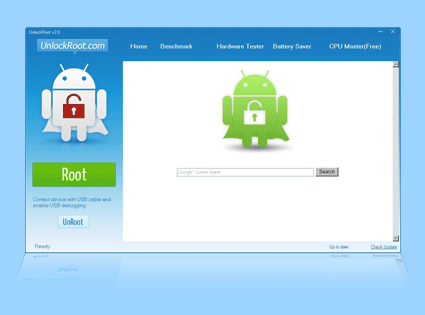
There are many different applications available for free download that let you root your phone but we are going to go with Unlock Root. It is a tool that can successfully root and unlock not just one or a handful of Android devices from the same manufacturer but many from different manufacturers. You can view the list of devices that can be rooted here (Note: it is a long list). With Unlock Root, first time rooters don't have to worry about bricking their devices. Whether you have an entry level or a high end phone, Unlock Root most likely will be able to root and unlock it.

Instructions
  1. Install the USB drivers for your device before you use Unlock Root. You can usually download the drivers from your device manufacturer’s website. 
  2. Download the Unlock Root software.
  3. Enable USB debugging mode on your device.
  4. Connect your device to your PC using a USB cable.
  5. Run the Unlock Root software. Wait for your handset to be automatically detected.
  6. Choose your device from the list of devices.
  7. Click the Root button to start the rooting process.
  8. Wait for it to complete the installation, after which you’ll be greeted with a message saying your device has been successfully rooted.
  9. After the rooting process, simply reboot your device for the changes to take effect.
  10. Enjoy your rooted device.
Give it a shot and let us know how it went!

Analyzed: HTC One V

A couple of weeks ago, we took a look at HTC's latest top of the line offering, the HTC One X. We also got a chance to review X's little brother, the HTC One V. This is the entry level version of 3 new models that HTC has released under the One banner. We have the S, the V and the top dog, the X. 

The HTC One V features a unique curved chin design that makes it easy to hold and you almost get the feeling of holding a regular phone. Like all One series phones, it packs an impressive list of features including a camera that captures every moment (even in low light) with crisp, vivid, beautiful photos. Plus, you get Beats Audio speakers that allow you to hear authentic, deep sound. The speakers are among the loudest we have heard on smartphones and the base is also very deep (for a phone). If you are tired of the ginormous phones that are coming out in the market, you will be happy to know that all these features come in a package that has a display size of 3.7" (a little larger than the iPhone 4S' 3.5" screen) and weighing in at a petty 115g (among the lightest we have tested). The display is good but not as good as, say a similarly priced Samsung or Nokia. Still considering the screen size, you won't be complaining while watching videos or cycling through your pictures. The other tech specs are as follows:
  1. 3.7" screen at a resolution of 800 x 480 pixels
  2. Qualcomm single-core 1GHz processor
  3. 512MB RAM
  4. 4GB internal storage plus up to 32GB via an external microSD card
  5. 5MP camera with LED flash
  6. Android Version 4.0 (Ice Cream Sandwich)
  7. 720P HD video recording - also allows photo capture while video recording
  8. Battery capacity: 1500mAh
  9. Weight: 115g
Based on our testing, we felt the HTC One V was held back by the single-core processor. Every time we tried to run some memory intensive applications or just plain multi-tasking we noticed significant lag in loading apps or just cycling through the menus themselves. This is the only sore point we had when testing the phone. Battery life is pretty average and we got a little under 6 hours with heavy use (gaming, watching videos, browsing). All said, it is not a bad phone for being an an entry-level model. It is a true testament to how far technology has come now that the features included in the One V are considered a entry-level features.

Our Rating: 

The HTC One V is currently on sale in India for around Rs. 17,500 (~$350).


It's here. The Samsung Galaxy S III.

The Samsung Galaxy S III is probably the most awaited Android smartphone to hit the market this year (along with the HTC One X). It has reached an almost cult like following akin to the iPhone series. Branded as the top cellphone maker in the world and considering what a resounding success its predecessor, the Samsung Galaxy S II was, Samsung and the Galaxy Version 3 has a lot to live up to. The S III was unveiled at an invitation only event in London on May 3rd and it was worth the wait. 

Samsung say their design credo for the S III was inspired by nature and it shows. You almost get the feeling you are holding a smooth pebble in your palm when clutching the S III. Samsung has gone all out with the S III and has packed it to the hilt with goodies. Here are the tech specs:
  1. 4.8" display at a resolution of 1280 x 720 pixels
  2. 1GB RAM
  3. A choice of 16, 32 or 64GB internal storage PLUS external microSD support upto 64GB (this is the best in the market)
  4. 8MP rear camera with zero shutter lag and 1.3MP front facing camera
  5. Samsung's own 1.4GHz quad-core Exynos processor
  6. 2,100mAh battery
  7. Android Version 4 (Ice Cream Sandwich)
  8. Weight: 133g
There's something else the display can do that's unique. Using eye-tracking, the phone's "Smart Stay" feature uses the 1.3MP front-facing camera to adjust the screen brightness or keep the screen lit. Samsung says, "The screen recognizes your eye movement. It knows exactly what you are doing, the screen won't go dark if you don't touch the screen, as it sees your eyes and recognizes that you are still looking at the screen and camera." And the phone doesn't only see you, it hears you too. Called "S Voice," the Galaxy S III has a feature similar to Apple's Siri, which will let you use your voice to control the phone. You can tell your alarm  to "snooze" and it will silence your alarm in the mornings.

Other highlights of the device include Smart Alerts, which tell you if you've missed calls and messages; and S Beam, which lets you share photos and videos by tapping two Galaxy S III phones together (have you tried the Bump app yet?). Samsung will also sell an optional wireless charging pad, which will let you charge the phone by just placing it on the device. You can also take a picture while recording a video and other imaging enhancements include contact tagging and automatic photo grouping based on who is in the picture.

The Galaxy S III will be launched in 145 countries and with 296 mobile operators in the coming months, marking Samsung's largest mobile launch ever. Europe goes first at the end of May, while 4G versions will launch in the U.S. in the summer. Pricing details have not been released yet.

Update: The Galaxy S III is slated for release in India in June 2012 at a starting price between Rs. 34,000 (~$680) and Rs. 38,000 (~$760).